HiveTeam puts an Orchestrator in charge: it dispatches work while real CLI agents — Claude Code, Codex, Gemini — each do their part in browser terminals. Everything runs on your machine, and every line of code lives in the repo you cloned.
You give the Orchestrator a goal
It dispatches workers with team send
Workers finish and team report back
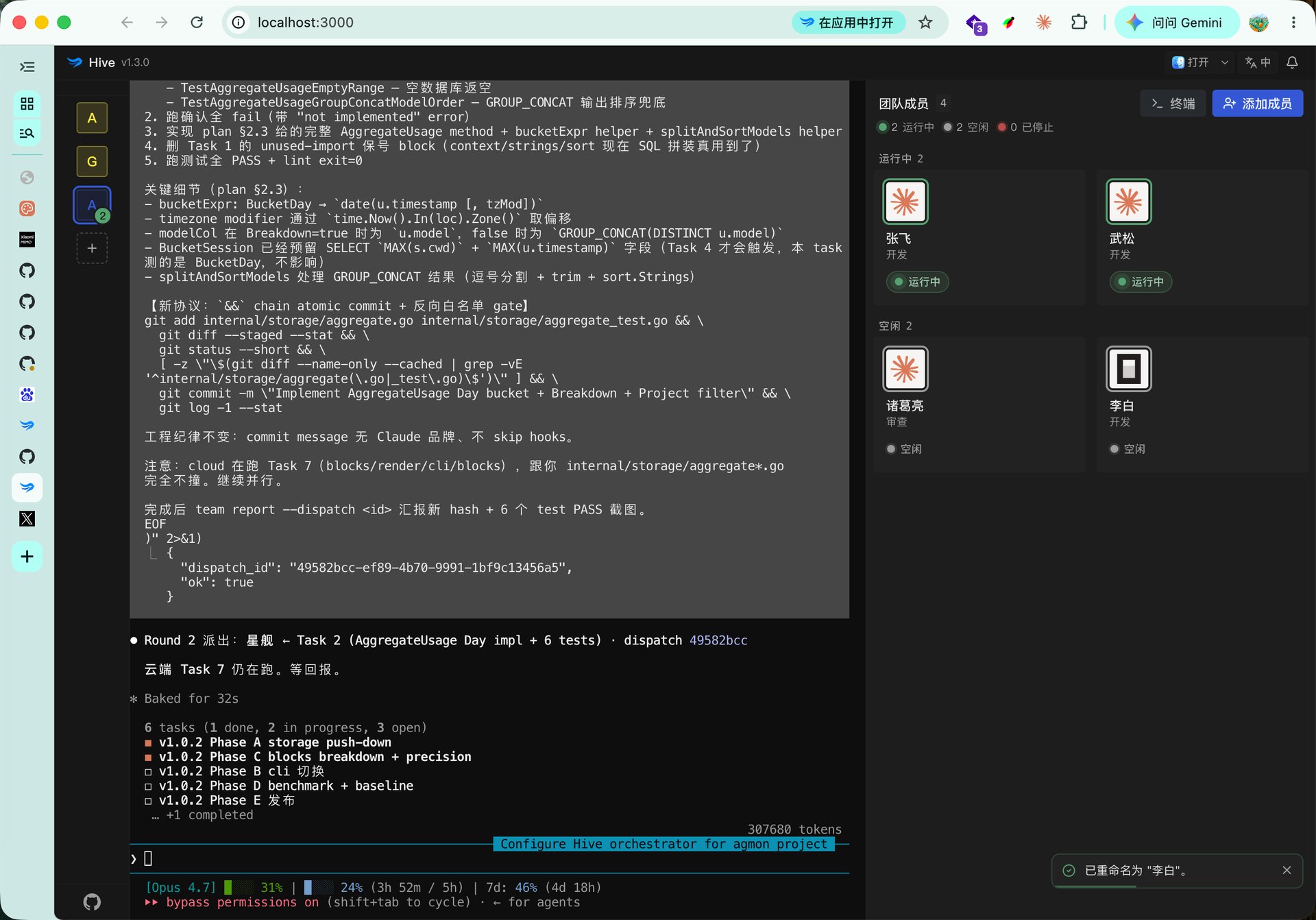
The Orchestrator's terminal is dispatching on the left; four teammates work on the right — a frame from a real delivery run, not a mockup.
Every teammate is a card: running, idle, stopped — the whole team at a glance.
No single agent ships the whole project. Each one owns the part it is best at.
Two models tearing each other's work apart beats one model grading its own homework. You only read the final diff.
The red-green loop spins inside the hive. What counts as green, and when to stop — that's your call.
Researcher, translator, screenwriter, debate partner — name a role, and the Orchestrator does the scheduling.
What makes a team of agents actually usable is everything around the dispatch.
Don't want to build a team by hand? Don't. The Orchestrator hires temporary coders, testers and reviewers per task, and dismisses them when the work comes back.
Split a goal into fan-out, review and test stages and run them end to end. Run records, logs, schedules and the stop button all live in the Workflows panel.
Workspace constraints, conventions and earlier decisions stay in the hive, and every later dispatch brings them to the right agent — no repeating yourself.
Your task graph sits in the repo: read and edit it in any editor, commit it to git. Tasks can declare dependencies ([needs: #3]), so blocked work never gets handed out early.
After a restart, each agent first tries its CLI's native session resume; if that fails, a fresh process gets an auto-written handoff brief. Queued tasks survive too.
Coder / Reviewer / Tester templates are built in and editable; 400+ bilingual community role templates ship with the repo — search, one-click import, works offline.
Also: multi-workspace sidebar · desktop notifications & alert sounds · installable as a PWA · open a workspace in VS Code / terminal with one click · bilingual UI
HiveTeam is a source-controlled, self-hosted fork: every line you run can be found in the commit you checked out.
The runtime, the web workbench, and the remote-access gateway in gateway/ — all in this one repository. No closed-source parts, no surprises in the install.
It never asks npm or the upstream release feed what's new. Upgrading is git pull — you always run the version you picked, and the diff tells you what changed.
The server binds 127.0.0.1; nothing listens beyond your machine. Remote access is off by default — until you flip the switch, the path simply doesn't exist.
BSL 1.1: personal use, internal deployment and forks are all fine; names and marks are governed by TRADEMARK.md. Pointing it at sensitive repos? Read SECURITY.md first.
Nine presets work out of the box, and that's just the start. Any agent that runs on your machine runs in HiveTeam: reuse the CLIs you've already signed into — HiveTeam itself needs no account and no API key.
You install and sign into each CLI yourself — HiveTeam never installs agents or touches your credentials. It just turns them into a team.
Sign in from your phone's browser, pair with the desktop once, and open your running hive from anywhere — not just to watch: the terminal takes real input on your phone, and work keeps flowing.
Ciphertext from phone to machine; the gateway only relays. Data and execution never leave your box.
Your machine dials out. No public IP needed, no ports exposed.
Pairing a new device requires someone physically at the computer to confirm. Any device can be revoked at any time.
The remote gateway's implementation lives in the repo's gateway/ directory — audit the encryption path yourself.
Requires Node.js ≥ 22 and pnpm. macOS / Linux are first-class; Windows is best-effort.
$ git clone https://github.com/zhouyuanxinand/hiveteam.git $ cd hiveteam $ pnpm install $ pnpm dev # open the local address it prints, usually http://127.0.0.1:3000
Updating is just as plain: git pull, then pnpm install --frozen-lockfile && pnpm build, and restart the process.